

SMSF Share & ETF Investing and Trading Course
Secure your spot for $22 (once-off). After payment, we’ll email your login and unlock all lessons and the certificate.
You’re viewing a locked lesson preview. Purchase unlocks all 8 lessons, quizzes and the certificate.
Theory becomes real the moment you place your first trade. This lesson walks through the complete Moomoo trade workflow — from logging in to monitoring a filled order — and explains the order types, costs and checks that protect your fund at the point of execution. The lesson finishes with a guided practice trade in Moomoo’s paper-trading (simulation) mode before any real money is committed.
- Navigate the Moomoo app and place buy and sell orders with confidence
- Choose the right order type (market vs limit) for the situation
- Understand brokerage, spreads and settlement (T+2 on the ASX)
- Record trades correctly for SMSF administration and audit
Estimated time: 45 minutes
4.1 How to Trade a Share on Moomoo
Before You Trade — the Trustee's Pre-Flight Checklist
Trading inside an SMSF carries extra obligations. Run this checklist before every order:
Step-by-Step: Placing a Trade on Moomoo
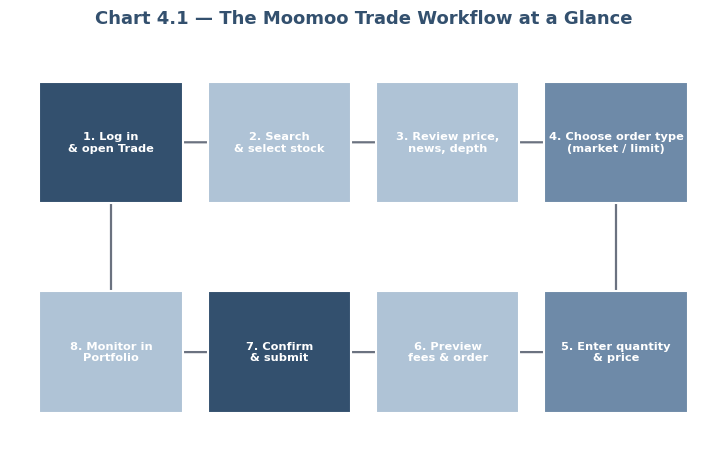
- Log into Moomoo. Open the app and sign in to the fund’s trading account with two-factor authentication.
- Navigate to the ‘Trade’ section. Tap ‘Trade’ at the bottom of the screen.
- Search for the stock or ETF. Enter the ticker code (e.g. an ASX code) in the search bar and select the correct listing — check the exchange and currency.
- Review the security’s details. Check the current price, bid/offer spread, day’s range, recent performance, announcements and news. For ETFs, review the fund profile and MER.
- Tap Buy (or Sell). Enter the number of shares/units. Note the estimated order value including brokerage.
- Choose your order type. Select market or limit (see table below) — for most SMSF trades a limit order is the disciplined choice.
- Set order parameters. For a limit order, enter the maximum price you will pay (buy) or minimum you will accept (sell). Choose the order duration (day-only or good-till-cancelled where available).
- Preview and confirm. Review the order ticket — security, direction, quantity, price, estimated brokerage — then submit.
- Monitor your order. Check the order status; once filled, confirm the contract note and view the position in the ‘Portfolio’ section.
- Record and file. Save the contract note to the fund’s records and note the purchase rationale in trustee minutes (this is what your administrator and auditor will ask for).
Low-cost trading with SMSF accounts, live news, paper-trading and deep charting — a solid all-round platform for trustees running their own share portfolio.
Order types — choosing correctly
| Order Type | How It Works | Best Used When | Main Risk |
|---|---|---|---|
| Market order | Buys/sells immediately at the best available price | Highly liquid securities; speed matters more than price | Price slippage on thin or fast-moving securities |
| Limit order | Executes only at your nominated price or better | Most SMSF trades; controlling entry/exit price | Order may not fill if the market never reaches your price |
Step reference table
| Step | Description |
|---|---|
| 1. Log in | Access the fund’s account with two-factor authentication |
| 2. Navigate to ‘Trade’ | Open the trading interface |
| 3. Select a security | Search by ticker; confirm exchange and currency |
| 4. Review details | Price, spread, announcements, news, fund profile |
| 5. Place the order | Buy/sell, quantity, order type, limit price |
| 6. Preview & confirm | Check the ticket incl. brokerage, then submit |
| 7. Monitor | Order status, fill confirmation, Portfolio view |
| 8. Record | Save contract note; minute the decision |
Costs and settlement — what actually happens after you click
- Brokerage: Moomoo charges a small commission per ASX trade (check current rates in the app; typically a few dollars or a small percentage with a minimum).
- Bid/ask spread: the hidden cost between the buying and selling price — minimised by using limit orders in liquid securities.
- Settlement: ASX trades settle on a T+2 basis — money and shares legally change hands two business days after the trade. Your cash must be available at settlement.
- CHESS sponsorship: ASX holdings are registered to the fund’s Holder Identification Number (HIN), keeping legal ownership clearly in the fund’s name — important for audit and for corporate actions such as dividends and DRPs (Lesson 5).
Lesson 4 Summary — Key Takeaways
- Always trade in the fund’s name, from the fund’s account, consistent with the investment strategy
- Follow the eight-step workflow: log in → trade → select → review → order → confirm → monitor → record
- Prefer limit orders for price control; use market orders only in liquid securities
- ASX trades settle T+2 under CHESS sponsorship in the fund’s HIN
- Save every contract note and minute every decision — your auditor will ask
Using Moomoo’s paper-trading mode, place one simulated buy using a limit order and one using a market order. Compare the fill prices and note the difference.
Short text response: describe your simulated trading experience — which order type you preferred, why and what you would do differently with real fund money.
Finish Course Early?
You have not completed all required lessons and assessments.